Kentico: How to export records from web forms

How to Kentico
26. 05. 2026
Lukáš Šorf

*The guide is created for Kentico webforms. In newer versions, the settings for some features may differ. Not sure which version of Kentico you are using? Our helpdesk can assist you.


All data submitted through contact, inquiry, or other forms on your website is stored in the Kentico content management system. You can easily export this data for your needs and work with it further.
Export Records

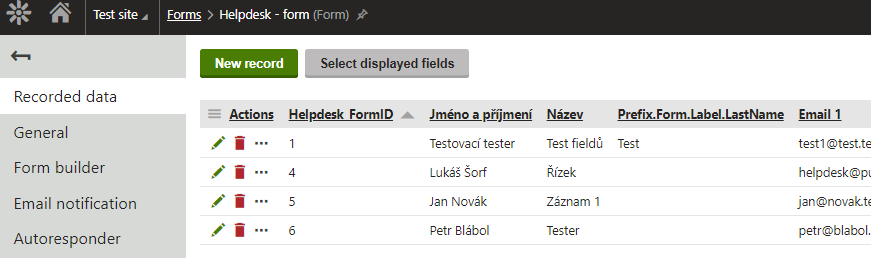
1/ In the Kentico administration, go to the "Forms" page with the forms on the website and click on the green pencil icon

2/ In Forms, on the tab "Recorded data", you can see a list of data, or records. This refers to users who have filled out the given form on your website.

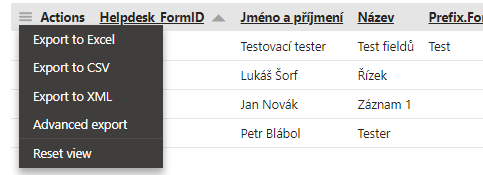
- click on the column "Actions" in the row with the column titles, a menu of exports will appear:

- by selecting one of the listed export formats (Excel, CSV, or XML), you will export (download to your computer) the records displayed on the page

The resulting export may look as follows:

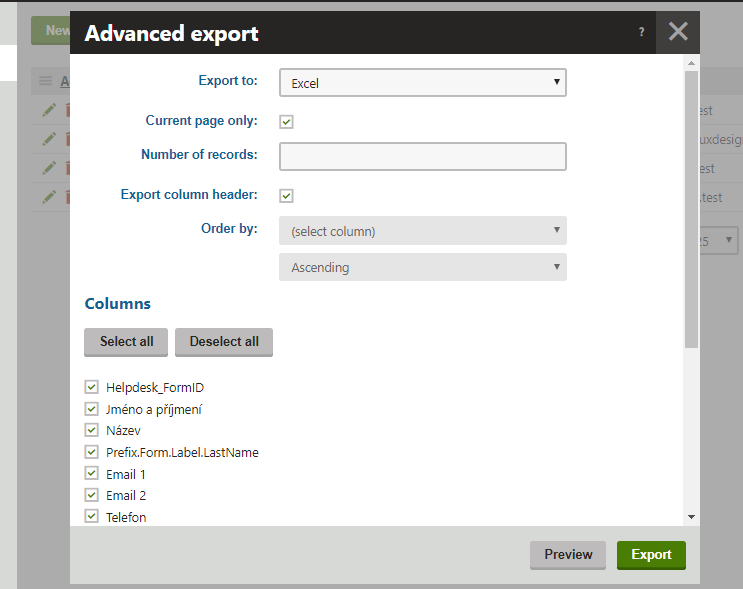
3/ By selecting "Advanced export" from the Actions menu, you can refine the export of records. A new window will appear:


  • in the "Export to" field, you choose the export format
  • by checking "Current page only," you ensure that only records from the displayed page in Recorded data are exported;
    if you have many records across multiple pages, leaving this option unchecked will ensure a complete export of records from the form
  • in the "Number of records" field, you can enter a numerical value for how many records should be exported
  • by selecting "Export column header," the header with column names will or will not be exported
  • in the "Order by" field, you can set the column and how it should be sorted by that column

At the bottom in the "Columns" section, you choose which columns should be exported.


4/ Once you have specified the export in this window, the requested records will be exported by clicking the green "Export" button


Done. Check the resulting file.